SportSQL
SportSQL: Interactive System for Real-Time Sports Reasoning and Visualization




A modular, interactive system for natural language querying and visualization of dynamic sports data, with a focus on the English Premier League (EPL).
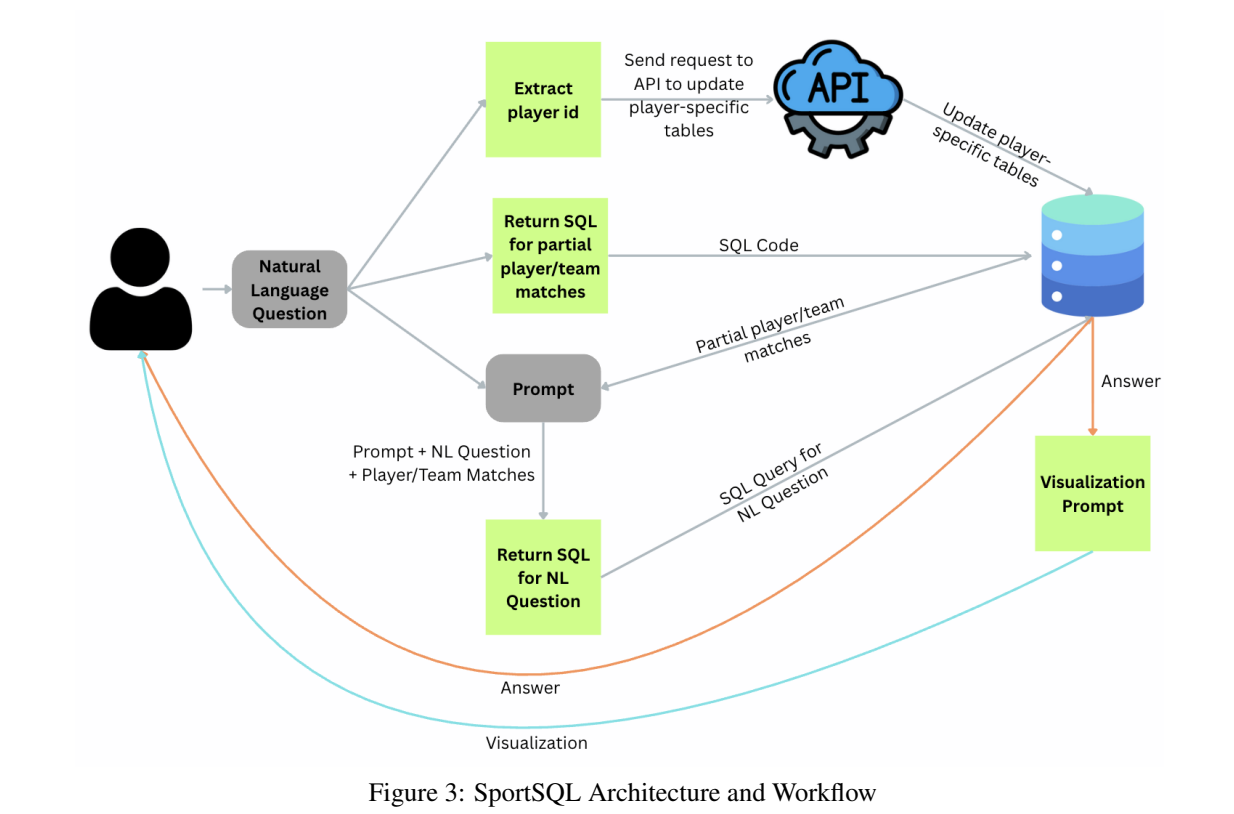
SportSQL translates user questions into executable SQL over a live, temporally indexed database constructed from real-time Fantasy Premier League (FPL) data. It supports both tabular and visual outputs, leveraging symbolic reasoning capabilities of Large Language Models (LLMs) for query parsing, schema linking, and visualization selection.
📄 Paper: SPORTSQL: An Interactive System for Real-Time Sports Reasoning and Visualization
🌐 Project page: https://coral-lab-asu.github.io/SportSQL/
🌐 Demo / Code: https://github.com/coral-lab-asu/SportSQL
🎯 Key Features
🔍 Three Query Modes
- Single-Query NL2SQL - Direct translation of natural language to SQL
- Fast, single-shot query execution
- Ideal for simple questions about current season stats
- Example: “How many goals has Erling Haaland scored?”
- Deep Research Mode - Multi-query comprehensive analysis
- Automatic query decomposition into sub-questions
- Historical data analysis across multiple seasons
- Player comparison and trend analysis
- Example: “Compare Haaland and Salah’s offensive performance over the last 3 seasons”
- Interactive Visualization - Automatic chart generation
- LLM-powered visualization selection
- Dynamic chart generation from query results
- Pre-built gallery of common visualizations
🏗️ System Architecture
- Real-time Data: Live updates from Fantasy Premier League API
- Temporal Indexing: Historical data across multiple seasons
- LLM Integration: Support for both Gemini and OpenAI models
- PostgreSQL Backend: Efficient query execution and data storage
- Modular Design: Clean separation of concerns for easy extension
📊 DSQABENCH: Dynamic Sport Question Answering Benchmark
To evaluate system performance, we introduce DSQABENCH, comprising:
- 1,700+ queries with SQL programs and gold answers
- Database snapshots for reproducible evaluation
- Diverse query types: Simple lookups, aggregations, comparisons, temporal queries
- Real-world complexity: Handles ambiguous player names, team aliases, and temporal context
🚀 Quick Start
Prerequisites
- Python 3.10+ (< 3.12)
- PostgreSQL 15+
- Conda (recommended) or Python venv
- Gemini API key (or OpenAI API key)
Installation
# Clone the repository
git clone https://github.com/coral-lab-asu/SportSQL.git
cd SportSQL

# Create conda environment
conda env create -f environment.yml
conda activate sportsql

# Or use pip
pip install -r requirements.txt

# Set up PostgreSQL (macOS)
brew install postgresql@15
brew services start postgresql@15

# Configure environment variables
cp .env.example .env
# Edit .env with your database credentials and API keys
Database Setup
# Initialize local database with FPL data
python src/database/setup_local_db.py
Run the Web Interface
# Start the Flask application
cd website
python app.py --server local --port 5000

# Open browser to http://localhost:5000
💬 Example Queries
Simple Queries
"Who are the top 5 goal scorers this season?"
"How many assists does Saka have?"
"Which team has the most clean sheets?"
Deep Research Queries
"Compare Erling Haaland and Mohamed Salah's offensive performance over the last 3 seasons"
"Analyze Liverpool's defensive statistics and trends this season"
"Show me players who consistently outperform their expected goals"
Visualization Queries
"Show me a chart of top scorers"
"Visualize the relationship between expected goals and actual goals for Haaland"
"Plot team standings by strength"
📁 Project Structure
SportSQL/
├── src/                          # Core source code
│   ├── database/                 # Database layer (PostgreSQL)
│   ├── llm/                      # LLM integration (Gemini/OpenAI)
│   ├── nl2sql/                   # Single-query NL2SQL
│   ├── deep_research/            # Deep research mode
│   └── visualization/            # Chart generation
│
├── website/                      # Web interface
│   ├── app.py                    # Flask application
│   ├── static/                   # CSS, JS, images
│   └── templates/                # HTML templates
│
├── data/                         # Dataset (CSV files)
├── docs/                         # Documentation
├── scripts/                      # Utility scripts
├── benchmarking/                 # Evaluation scripts & results
└── update_player_mappings/       # Ground truth tools
See STRUCTURE.md for detailed documentation.
🔧 Configuration
Environment Variables
Create a .env file in the project root:
# PostgreSQL Configuration
LOCAL_DATABASE_HOST=localhost
LOCAL_DATABASE_PORT=5432
LOCAL_DATABASE_USER=your_username
LOCAL_DATABASE_PASSWORD=your_password
LOCAL_DATABASE_NAME=postgres

# LLM Configuration (choose one or both)
# Gemini (default)
API_KEY=your_gemini_api_key
GEMINI_MODEL=gemini-2.0-flash

# OpenAI (optional)
OPENAI_API_KEY=your_openai_api_key
GPT_MODEL=gpt-4o
LLM Provider Selection
# Use Gemini (default)
python website/app.py --server local

# Use OpenAI
python website/app.py --server local --llm openai
See docs/LLM_USAGE.md for detailed LLM configuration.
🧪 Evaluation
Run the evaluation pipeline on DSQABENCH:
# Evaluate the full pipeline
python scripts/evaluate_pipeline.py

# Test specific components
python scripts/test_evaluation.py

# Run benchmarking scripts
python benchmarking/scripts/llm_sql_evaluator.py
📖 Documentation
- STRUCTURE.md - Detailed project structure and organization
- docs/LOCAL_SETUP.md - Local development setup guide
- docs/LLM_USAGE.md - LLM provider configuration
- docs/Dynamic_Sports_QA.pdf - Research paper
🎓 Citation
If you use SportSQL or DSQABENCH in your research, please cite:
@inproceedings{ahuja-etal-2025-sportsql,
    title = "{SPORTSQL}: An Interactive System for Real-Time Sports Reasoning and Visualization",
    author = "Ahuja, Naman and others",
    booktitle = "Proceedings of the 2025 International Joint Conference on Natural Language Processing: System Demonstrations",
    year = "2025",
    url = "https://aclanthology.org/2025.ijcnlp-demo.11",
    pages = "TBD"
}
🛠️ Development
Running Tests
# Test imports after reorganization
python test_imports.py

# Run evaluation tests
python scripts/test_evaluation.py
Database Management
# Refresh local database with latest FPL data
python src/database/setup_local_db.py

# Update specific player data
python scripts/update_db.py
Adding New Features
The modular architecture makes it easy to extend:
- New query types: Add to
src/nl2sql/orsrc/deep_research/ - New LLM providers: Extend
src/llm/wrapper.py - New visualizations: Add to
src/visualization/ - New data sources: Extend
src/database/operations.py
🤝 Contributing
We welcome contributions! Please:
- Fork the repository
- Create a feature branch (
git checkout -b feature/amazing-feature) - Commit your changes (
git commit -m 'Add amazing feature') - Push to the branch (
git push origin feature/amazing-feature) - Open a Pull Request
📄 License
This project is licensed under the MIT License - see the LICENSE file for details.
🙏 Acknowledgments
- Fantasy Premier League API for comprehensive soccer data
- Google Gemini AI and OpenAI for LLM capabilities
- PostgreSQL for robust database support
- Flask for web framework
- CORAL Lab at ASU for research support
📧 Contact
For questions or issues:
- Open an issue on GitHub
- Check the documentation
- Read the paper
🌟 Star History
If you find SportSQL useful, please consider giving it a star ⭐!